since 2/28/10

Member
Copyright Protected

Blog Trains

CU license
Showing posts with label PTU KIT. Show all posts
Showing posts with label PTU KIT. Show all posts
Friday, February 24, 2012


Tutorial written by Mavy Storme
Just a note but if you are new to PSP you might not fully understand this tutorial as sometimes my thoughts do not come out quite the way I mean for them to when I write them down and I can be very hard to follow. I will explain to the best of my ability and hopefully you can follow my thoughts.
Kit: My Color Me Green kit that can be purchased here.
Tube: Barb Jensen’s tube layered 23 foundhere
Mask: WeeScotsLass Mask 307 here
Font: P22 Corinthia, and Pixlette for copyright
Plug ins: Xero soft mood and Lokas Software 3D shadow
Please note I use PSPX4 so your PSP may not have all the features, or have the features in the same place as mine does.
I usually open everything I’m going to use while to create the tag right then, some I actually use, others I tend not to, depends on how the tag turns out. In this case, I opened some I used, and I didn’t open others I used, but the ones that I did use were: Paper 12, Elements: Banshee word art, glitter2, swirl2, frame1, skull1, and bow 3.
Now let’s see if I can explain how I made the tag…
Open a new image in your PSP, 700 width X 500 height. Make sure it is 72.000 DPI because most artists (I recently learned XeracX allows a higher DPI) allow only 72.000 DPI. Copy and paste frame one to your new image. Go to layers, load mask from disk, and select WSL_Mask307. Merge group.
Open swirl2, copy and paste over top of your mask layer.
Open Frame1, copy and paste over the swirl2 layer.
Open bow3 , copy and paste over frame1, resize 75% twice. (The reason for this is that when you resize it 50% you half it, but if you resize it 75%, you are only resizing the next resize by 75% so you aren’t really resizing it 50%. ) Move your bow to the top of the frame and center it on the top line. (If using X4 just go to Objects, Align, and Horizontal Center.)
Open skull1, copy and paste it as a new layer over the bow layer. Resize 75% 3 times. (For the same reason as above) Move over the top of the bow and center.
Open the close up for the tube. Select your preferred layers if using a Jensen like I am, or any other layered tube, copy and paste merged under the frame layer. Or if you want to do it the hard way (like I do) you can select your layers, merge visible, drag and drop the merged copy, and close the original tube without saving but I don’t recommend you try this unless you have a little experience in PSP. And then copy and paste it under the frame layer. Get your Magic Wand tool, and select the outside of your frame.
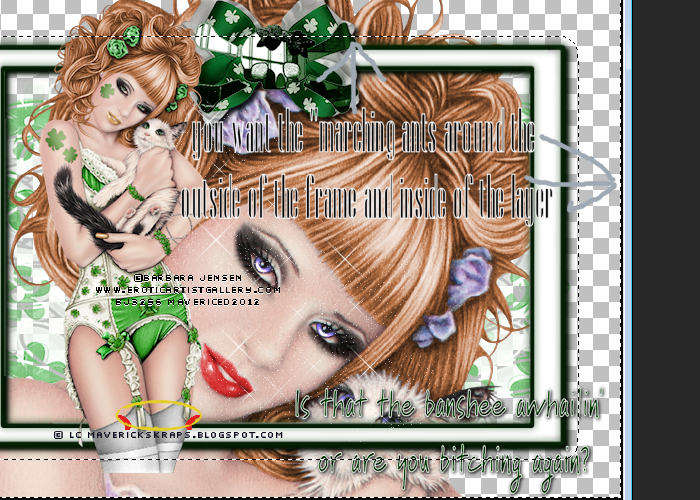
click to see larger
Go to Selections, Invert, and Contract it by 19.
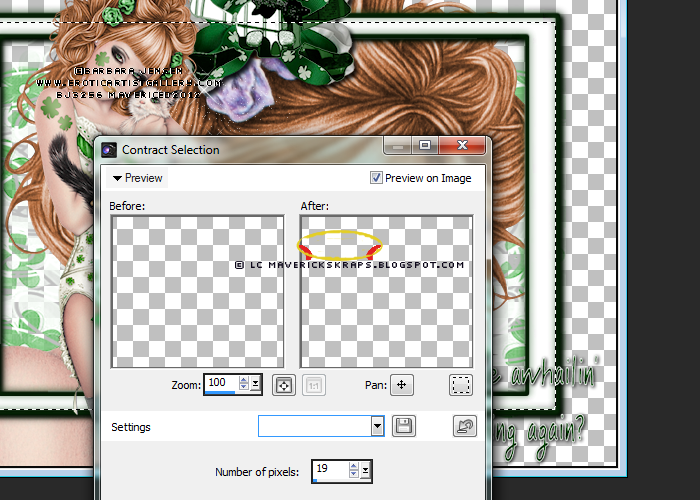
click to see larger
Invert selection again to where it looks like it is in the top screen shot. Select your close up layer and then press the delete key on your keyboard. Right click on the tag with your magic wand to make the dancing dotted lines go away.
Go to Effects, Xero, Softmood, see settings in screen shot below.
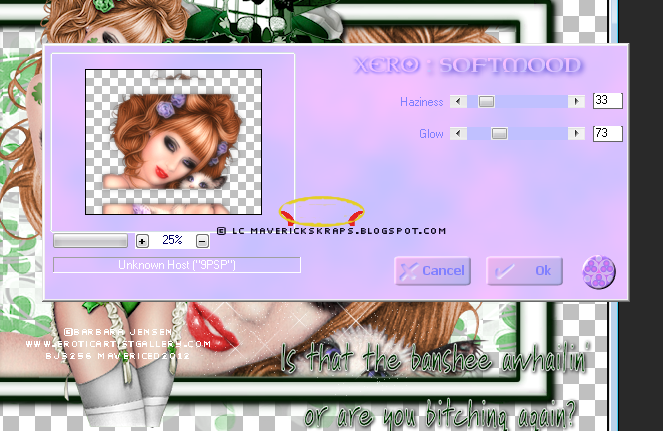
click to see larger
Open your full size tube, select layers, copy and paste merged (or do it the hard way). Move the tube to the left size of the bow after resizing 75%.
Open Glitter2 copy and paste under the full tube.
Open the wordart, copy and paste on top layer, resize 75%. Move to the right bottom corner of the frame, see if you can get the center of the word art on either side of the top and bottom of the frame. Go to settings, Lokas 3D. See screen shot below for settings.
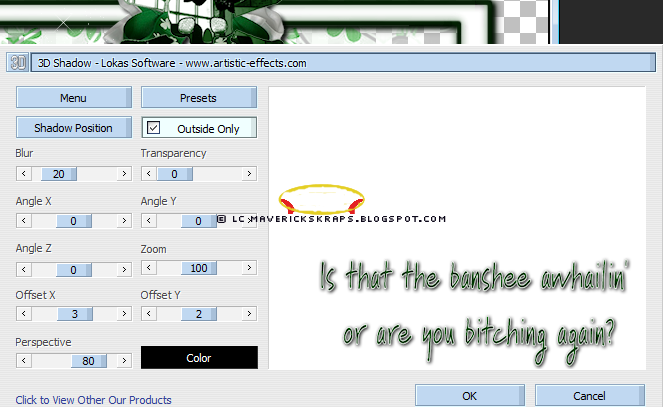
click to see larger
When you’re all done you should have 10 layers; your full tube layer, word art layer, glitter layer, skull layer, bow layer, frame layer, close up layer, swirl layer, and merged mask layer.
You’ll want to open a new raster layer so that it doesn’t conflict with the rest of your layers.
Add your copyright credits, I use pixlettte at size 10, with anti-alias off, and stroke width at 0. I convert to raster and add a glow (eye candy 3.1).
After that you can use your font and give it to your friends!
Hope you enjoyed and made use of this tutorial, thanks for looking!
Wednesday, February 22, 2012
I went out on a limb and tried to make a PTU scrap kit of my own. It's a St. Patrick's Day kit, I call it Color Me Green. It is tagger sized with 36 elements and 15 papers. Maybe one of you can use it lol.
You can purchase it here and while you're there if you are a kit maker or just want some word arts for some reason or another check out my Word Arts!
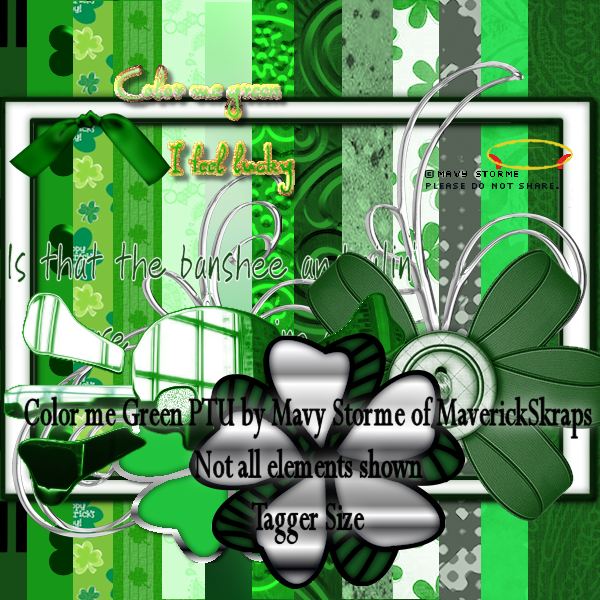
Click for larger size preview!
Thursday, February 9, 2012
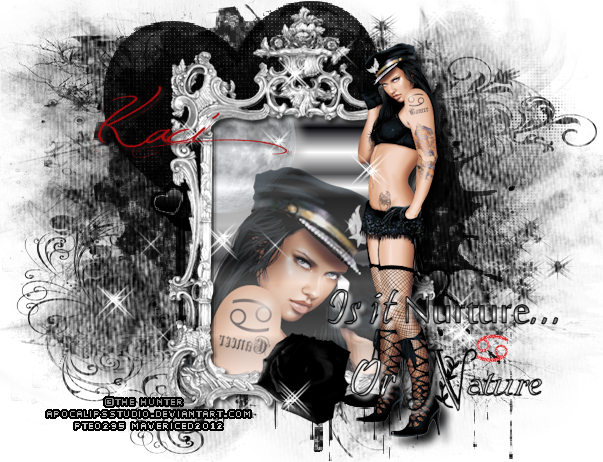
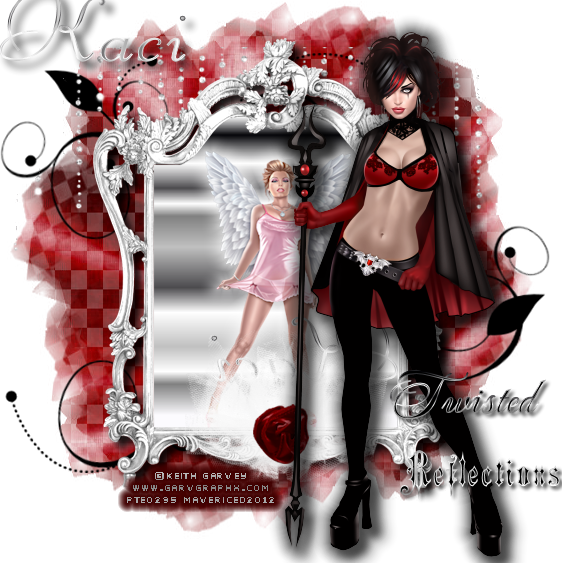
Got to playing with my new Hunter Cazador tube from PTE, it's one of his zodiac tubes. Me being a Cancer, of course I got her ;). Got to reading up about Cancers last night looking for a good word art idea, AND, I learned that Cancers are very good nurturer's and apparently we are supposed to be pretty hot in other areas too if you get my meaning ;). This is what I came up with using Kaci's Twilight Lovr Kit and my new tube.
Saturday, January 28, 2012
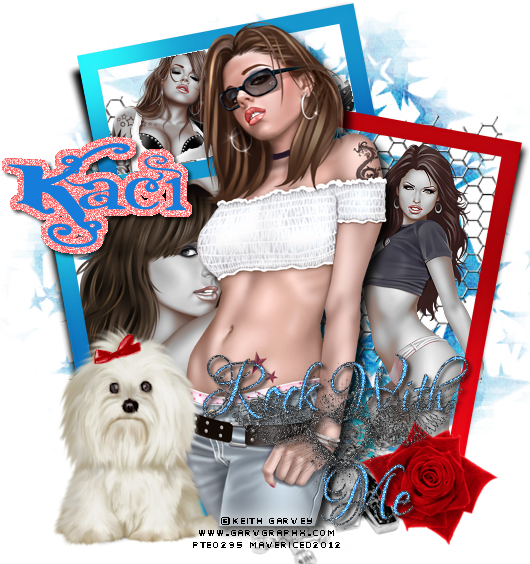
With Kaci's new kit Rockabilly found here on her blog I made another tag
My fiance got me this Barb Jensen pack a while back and I hadn't used this particular tube much, never seemed to have a kit that fit her, I do now, even though Kaci made it to go with a Myka Jelina tube.

Friday, January 27, 2012
I'm pleased to say that Kaci of Scrappin' Krazy Designs has been kind enough to let me CT for her with tags! And so using Kaci and Viki's Collab kit Raven I created some tags!
Here is a link to her blog where you can find her stores where Raven is being sold.
The first is a Tony Mauro tag:

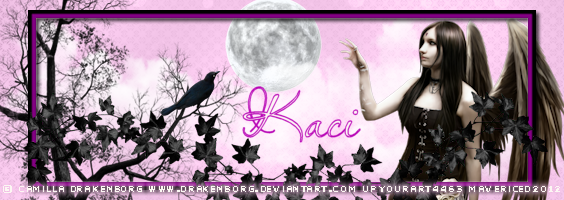
The second is a Camilla Drakenborg forum set:

Thursday, January 26, 2012
Be gentle, it's the first I've ever written. lol

Tutorial written by Mavy Storme
Just a note but if you are new to PSP you might not fully understand this tutorial as sometimes my thoughts do not come out quite the way I mean for them to when I write them down and I can be very hard to follow. I will explain to the best of my ability and hopefully you can follow my thoughts.
Just a note but if you are new to PSP you might not fully understand this tutorial as sometimes my thoughts do not come out quite the way I mean for them to when I write them down and I can be very hard to follow. I will explain to the best of my ability and hopefully you can follow my thoughts.
Kit: PTU Kit Fireball from Scrappin’ Krazy Designs found here.
Her stores are listed on site.
Tube: Arthur Crowe’s Spikette found here
Mask: Moonbeams and Spider webs mask 21 here
Font: Splendid Ornamenty, and Pixlette for copyright
Plug ins: Eye candy 3.1 glow and drop shadow, Lokas Software 3D shadow
I usually open everything I’m going to use while to create the tag right then, some I actually use, others I tend not to, depends on how the tag turns out. In this case, I used everything I opened, which was papers P01, and P05, Frame1, Dice, safety pin, devil heart, and metal swirl.
Now let’s see if I can explain how I made the tag…
Open new paper (you can resize when done before you add the copyrights if you don’t like the size) 600X600 with a transparent background. My new images are automatically sized to 72.000 dpi, if yours isn’t you’ll want to set it to that.
Copy and paste paper P05 to your new image, go to layers, and load your mask. Merge the group in your layers section before continuing.
Get your second paper, copy, and paste to your tag. Copy and paste the frame to the tag next. At this point, you should have 4 layers, your transparent background, your masked paper, your second paper, and your frame.
Get your magic wand tool and highlight the inside of the frame, go to selections and invert. Click on the layer with the paper and delete, then go back to your frame, there should be a nice paper square inside your frame and nothing on the outside.
Go to effects, Lokas Software, 3D shadow and use the settings in the image provided below.
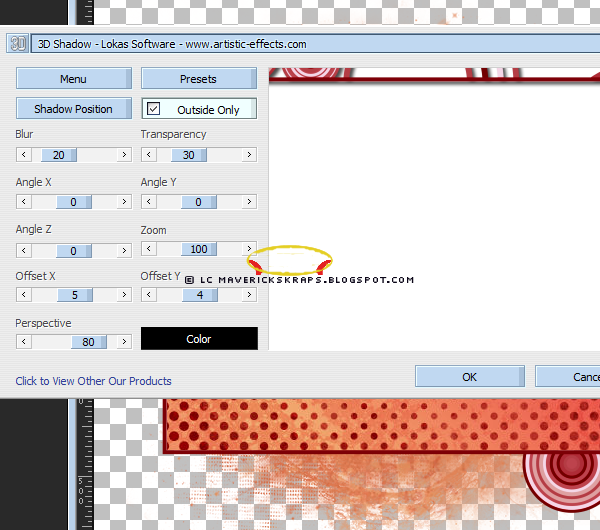
(click img to see larger)
Get the metal swirl, copy and paste to your tag under the frame. Resize to 65% of original size, then go to your move tool and move it to the left, yet still inside the frame.
Get the safety pin, copy and paste, and resize to 25% . Go to move tool, move to the top of the frame. Duplicate layer, move one below the frame layer. Go to the erase tool, and on the top safety pin layer remove one side of the safety pin to make it appear that the pin is going around the frame.
Get the dice, copy and paste to your tag. Resize to 25% also. Move up to the bottom half of the pin, duplicate layer, and if you have to zoom in to remove one side of the top layer to make it appear to be on the pin. I had to zoom to 150% to get it correct. Just a note but if you are using a large eraser size you’ll remove more than you mean to. Mine was set to size 5.
Zoom back out if you had zoomed in.
Get the devil heart, copy and paste, and then move to the lower right hand side. Go to layers, eye candy and use the drop shadow, see settings on the image below
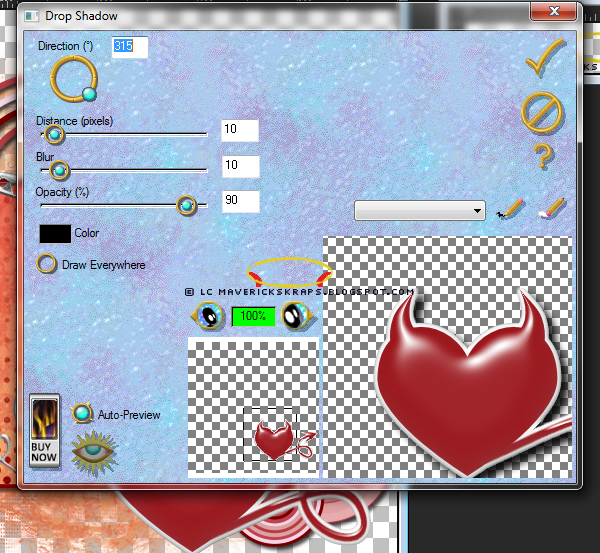
Merge down the following layers, copy of raster 6, copy of raster 5, raster 6, raster 5, and raster 3.
Open your tube, if you aren’t using Spikette, try to make sure you have one with a close up included. Get your close up tube and copy and paste under the frame. Click on your frame layer, go to your magic wand, highlight the inside of the frame, go to selections, modify, expand 3 see image.
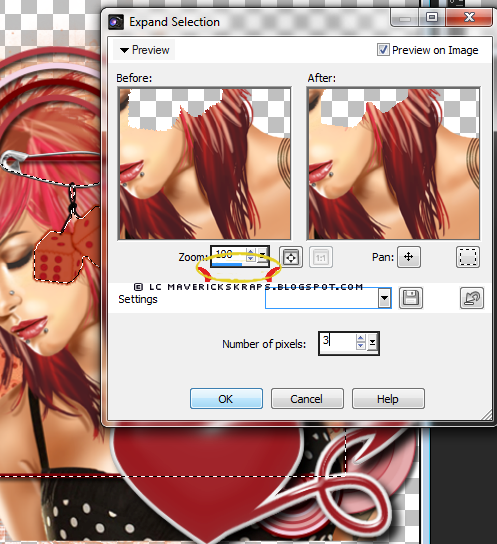
Then go to selections and invert. Select the tube layer and delete.
Click on the tube layer, right click for your properties, change the opacity to 50% so that she is very opaque.
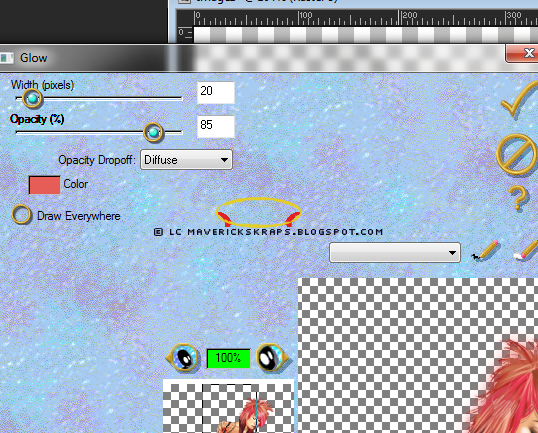
Get the full tube, copy and paste under the devil heart, go to image, and flip horizontal (for other versions I believe it is mirror) move slightly to the right so that you can still see the face of the closeup. Effects, eyecandy 3.1, glow, see settings on the image.
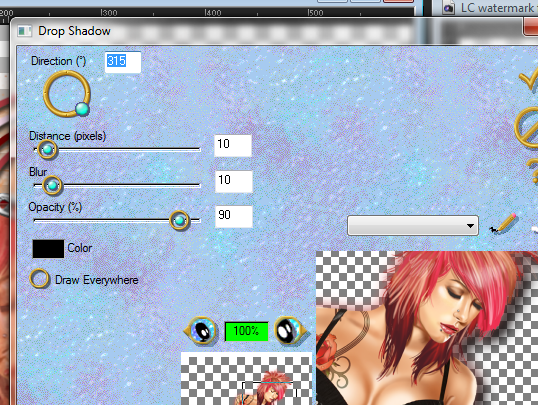
Then do a drop shadow, settings on image.
Add your copyright credits, I use pixlettte at size 10, with anti-alias off, and stroke width at 0. I convert to raster and add a glow (eye candy 3.1).
After that you can use your font and give it to your friends!

Subscribe to:
Comments (Atom)
Tagger's Den
The Tagger's Den forum is dedicated to encouraging the free exchange of ideas and knowledge and to expanding the creativity of all it's members, taggers, designers and artists. We are committed to a deep and abiding belief that art should not be censored, that artists should not starve, and that every member should have equal access to all of the ...special things they need to fuel their individual creativity. We provide an endless stream of challenges and opportunities to win and earn tubes, scrapkits and more, plus there's always someone willing to offer a helping hand, be it a tagging problem or a human problem. We offer our hand in friendship to you and welcome you to the Tagger's Den. You can follow us on our blog too!
TYVM to Lesia for making this gorgeous blinkie for the Den!
TYVM to Lesia for making this gorgeous blinkie for the Den!
blinkies

here is my blinkie!
CT

I sell at